Freewheeling Apps are a durable substrate for the future of software.
Easy to download. Easy to run. Easy to modify. Easy to share.
Free and open source. I'm not trying to make money from them, only meaning. I'm beholden to nobody. No dark patterns, ever. I'll never sell them to someone else; there's nothing to sell.
All apps reward curiosity. I care about the experience of making changes to them as much as the experience of using them. You can often look inside the app you're running and modify it with the press of a button, without needing additional software.
Each app quickly stabilizes, and then seldom updates. Because timeless software is safer and more trustworthy (it can't change its mind). Definitely no auto-updates. I think I might be able to get to 50 years without an update. Join me on that voyage!
Individual apps stay simple; apps spawn forks and remixes rather than grow complex.
All the apps
A family tree, with forks indented below their parents. If multiple forks need a change, it's often convenient for me to make the change as high up (unindented) in this tree as possible.
lines.love: The original plain-text editor you can draw line-drawings in.
lines-and-links: A few lines modified to support clickable links. If a word surrounded by whitespace corresponds to a filename it gets an underline and becomes clickable. Now pulled into some of my other apps.
lines-cjk.love: A place to support CJK languages. Currently only has a font change, because I don't know any of these languages. If you'd like to help, please get in touch.
lines-mobile.love: lines.love tested for mobile devices. Adds a file picker where the original switches to new files when you drop their icons on the window.
etch.love: an ephemeral slate you can write and draw shapes on, then export to html+SVG with the press of a button.
pensieve.love: The app I use for all my note-taking. Manages 800MB of notes over 20 years.
techmeet.love: fork of pensieve.love for a specific community. If you'd like one for your community, please get in touch.
capture.love: A secondary tool for pensieve.love. Sometimes I just want to capture a note on a blank slate without getting distracted by the giant dashboard of all my notes. But what I capture here still becomes available in pensieve.love.
lines2.love: A new version of lines.love with radically rearchitected internals. Among other things, it enables structured editors to be more easily created. But it's also smaller, faster and more robust.
text2.love: lines2.love with all the line-drawing support ripped out. Frees up complexity I can use to take it in new directions.
view2.love: text2.love with all the editing support ripped out.
fractions.love: A structured editor for fractions rendered vertically (with a horizontal divider rather than a slash as we've gotten accustomed on computers). Demonstrates the sorts of things lines2.love makes much easier to accomplish.
notebook.love: A rudimentary computational notebook where you can write prose containing named blanks, and perform arithmetic in indented lines that fills in named blanks.
highlight.love: A viewer for simple styled text with configurable colors.
curio1.love: A little toy exploration of a tiny state space of 8 similar programs. See each one running, look at its source code, compare its source code with “nearby” programs.
tabs.love: Prepend 3 dashes to any line in a text file to turn it into a bookmark ‘tab’ in the right margin that you can click on to jump to it. This app embodies the kind of interaction I live for: somebody came up with the idea for it online, and I was inspired to build it for them. If you ever think of an idea and wish you could build it, please get in touch.
doodle2.love: An experiment in drawing doodles alongside text. Doodles are attached to a specific character and move/delete with it.
attributes.love: An experiment in maintaining ranged attributes as in Emacs.
template-live-editor2: Template repository for a new approach to code editing. Forks of this app can be edited live as they run using the driver.love app below.
carousel2.love: Lua Carousel, a small environment for writing small, throwaway programs on phone or computer.
text.love: lines.love with all the line-drawing support ripped out. Frees up complexity I can use to take it in new directions.
view.love: text.love with all the editing support ripped out.
links.love: A few lines modified to support clickable links. If a word surrounded by whitespace corresponds to a filename it gets an underline and becomes clickable. Compare lines-and-links above; this one just doesn't have drawings.
pong.love: An experiment in code editing. A game of Pong whose source code you can edit any time by pressing ctrl+e. Now this support has been pulled into many of my apps.
template-live-editor: Older template repository for building live-editable apps. Fork any new apps from template-live-editor2 above. But all the forks below continue to work and can be live-edited. The protocol with driver.love has not changed.
sum-grid.love: Little app for helping first-graders practice addition by solving magic square problems. I made this when my kids ran out of such problems in their textbook and were hungry for more.
carousel.love: Lua Carousel, a small environment for writing small, throwaway programs on phone or computer.
carousel-cards.love: An easy series of puzzles to trick yourself into learning programming. At every point you have a fully programmable environment available if the muse strikes and you want to forget the puzzles and build something new.
template-carousel-mobile: Template repository for apps that can run and be modified on mobile devices as well as computers.
sokoban.love: A client for Sokoban. Play 500+ puzzles on phone, tablet or computer. If you want to skip to a level far away, edit the source code. I believe it is possible to create apps with good UX that require editing their source code for some tasks. Tell me how far I am from demonstrating that.
broadsheet.love: A text viewer that wraps lines at a readable length, switching to multiple columns as it finds space.
spell-cards.love: Rudimentary flashcard app for helping set spelling exercises for schoolchildren based on voice recordings of words.
crosstable.love: Little tool for managing tournament cross-tables. Automates the drudgery of sorting rows and columns at once.
luaML.love: A template repository for rendering a very simple markup “language”. There's no new syntax, you just work with Lua table literals.
snap.love: A tool for drawing boxes and arrows. Probably my single most used app.
~alex27/snap.love: A fork for someone else with some custom features. If you'd like a custom fork of any app for yourself, please get in touch. My apps provide source code and are easy to modify, but it doesn't have to be you modifying them. You just have the option to make changes to them any time in the future. If you have ideas, I'd love to bring them to life.
table.html: A table you can edit on your browser. Though you still need to adjust rows/columns outside the browser.
tz.html: A timezone converter with minimal interactivity, that you can share around confident that everyone is seeing exactly the same thing you are.
annotations: An environment where you can paste in some text, then annotate it on a second column and save your annotations locally alongside the text.
I'll also include here an “approll” of simple offline-friendly html apps by others that I admire and have been influenced by:
· note by Cristóbal Sciutto Rodríguez, the seed for all my html projects so far.
· Yon, m15o's text editing environment inspired by the Plan9 Acme editor.
· ink n switch, Eli Mellen's text editor that you can also doodle on.
· Tom Larkworthy has been doing some fascinating work to make Observable offline-friendly.
Coming soon: networking. Freewheeling Apps will become much more useful when you can use them to get your data out of other silos service providers.
This blog post reminds me of the time 10 years ago when I tried to do away with Linux's desktop environment because it seemed overly complex and hard to wrap my head around. I had a lot of trouble running wifi without the desktop environment, and it left me quite bitter. Linux had seemed like a hacker's OS when I first started out. But it was trying so hard to compete with Windows that it was starting to seem like Windows in all the wrong ways. That experience contributed to me walking off into the wilderness to build Mu.
I've gone back and forth between two tendencies in my life. On the one hand, I used to brag about a minimalist setup living in text mode, only running startx as needed, long after the world had moved to fully graphical desktop environments. On the other hand, I was frustrated early on with the limitation of pure text, creating a little bit of Vimscript to view and edit drawings inside a code fold inside code comments. (I don't remember what format I used for the drawings. Maybe Inkscape? I always liked its format and found it quite easy to hack manually.)
And these poles have continued to attract me in turn. I wanted to build Mu with just text mode for a long time, and now in the past couple of years I seem to have tried to minimize my use of terminals, with all their ugly historical and path-dependent hacks, and to do more on a graphical canvas (of a game engine).
But then, last year, I had a fascinating and also slightly frustrating conversation with a friend where we realized we had very different associations for the term "text". When I said I wanted to keep something as "just text" I meant "viewable with cat on a vt100." (But with Unicode.) When they said they wanted text they meant, "everything you could do in the tradition of book publishing before the advent of computers." (But maybe not images? Equations and line drawings, certainly. And video is right out.)
Another dimension of our disagreement: I was thinking of text in terms of compatibility. What can you do regardless of what device you have on you right now. They were thinking in terms of "what's possible with an extremely low-power reader without regard to compatibility." Also, I imagined authoring text and reading it as happening on the same device. Perhaps they imagined authoring on high-powered devices and reading on low-powered ones.
So, 30 years after I started programming, I still don't really understand what I want. I try to clear my mind of the cobwebs created by the hacky, historically path-dependent past. But I'm not there yet.
As I start teaching the kids programming, I’ve been thinking about how to motivate it to them. They do a lot of drawing, so that seemed like a potential hook to show how drawing on the computer may make some things easier (erasing, manipulating, repeating) and other things harder (e.g. drawing well).
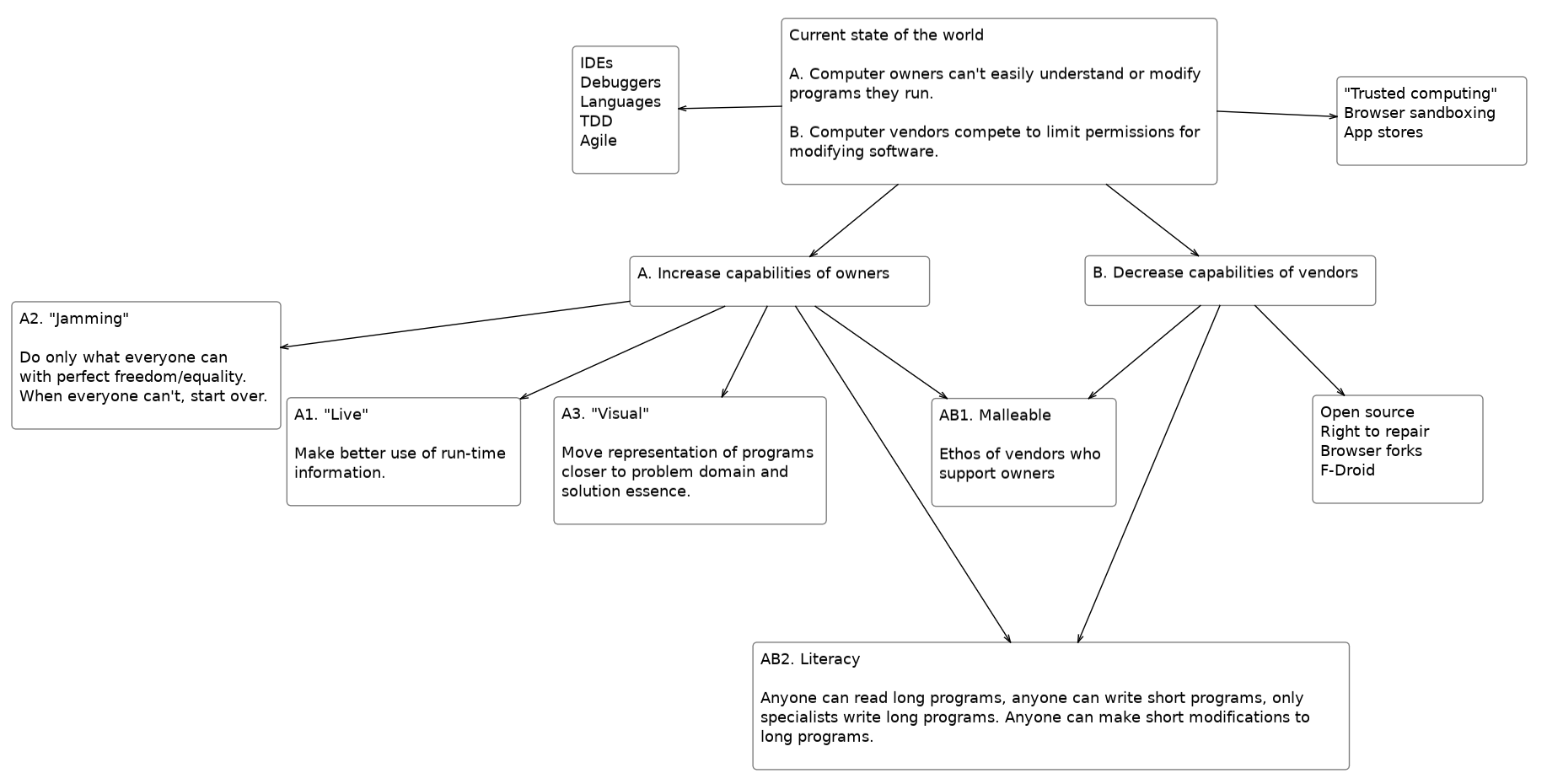
I've been moved by a few different recent pieces [Ⅰ][Ⅱ][Ⅲ][Ⅳ] to think anew about what I want, and how it relates with goals a lot of other people seem to have. Here's a map that the rest of this post tours:
I'm very dissatisfied with the current state of the world in two regards:
𝐀. Computer owners can't easily understand or modify programs they run.
𝐁. Computer vendors compete to limit permissions for modifying programs.
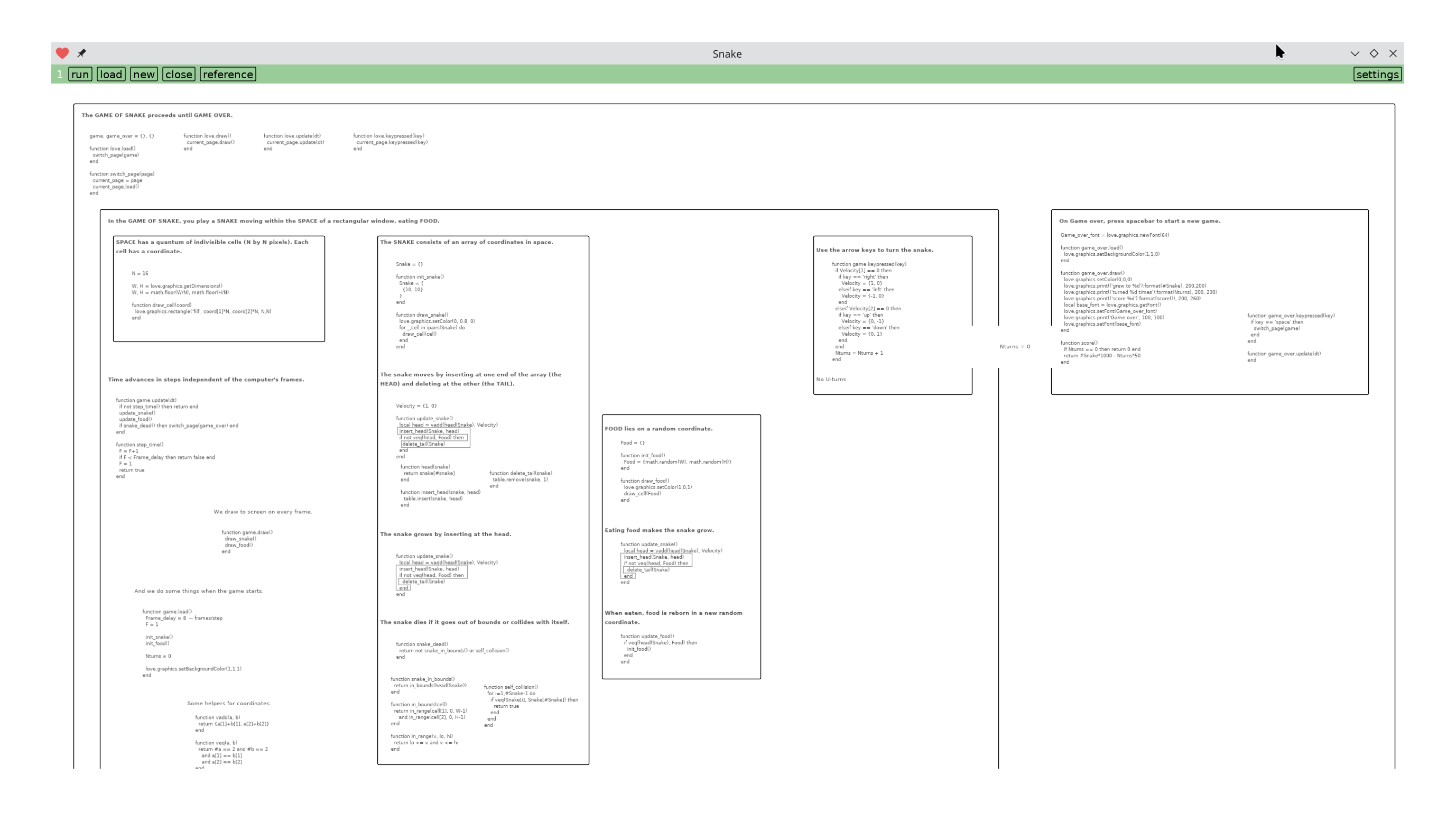
I've been reading The Nature of Order by Christopher Alexander, and it's inspired me to experiment with this representation to communicate the global structure of the source code of the Game of Snake:
The whole program is arranged on a 2D surface within a series of nested boxes. You can hit ‘run’, and it extracts the code from the surface and runs it and you get to play a game of Snake. (Only on a computer; even though the app runs on a phone, you can't play this particular game of Snake without arrow keys.) So it can be viewed as a sort of Literate Program, even though the representation I'm tangling from has a richer UI than is typical, a surface you can pan and zoom around with a mouse wheel or touchscreen. (It doesn't support editing yet. This is a purely reading experience for now.)
I wasn't trying to build yet another Literate Programming experience, though. What was on my mind was Christopher Alexander.
Read more →
* *
May 12, 2025
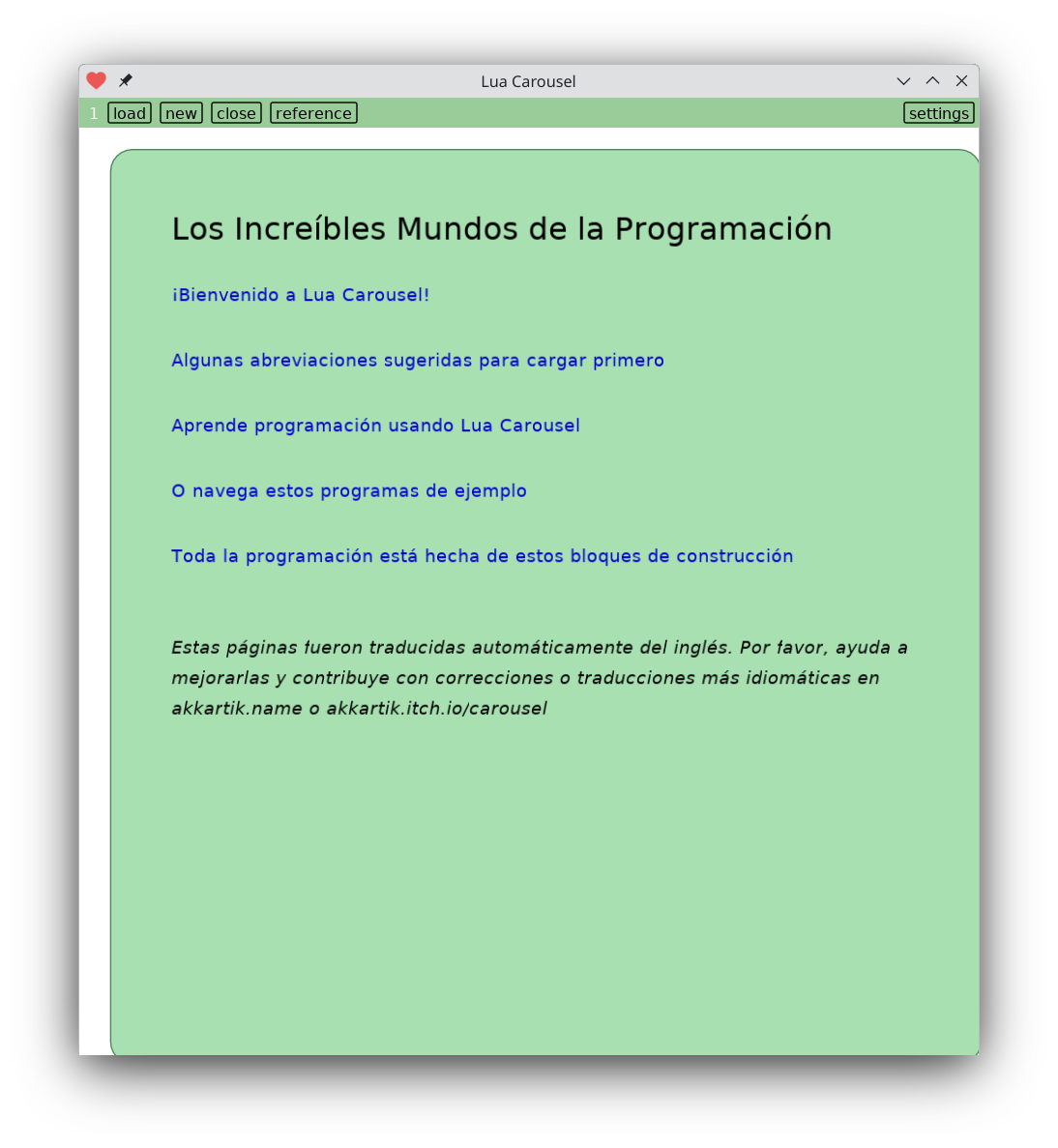
Lua Carousel now comes with a comprehensive system of online help you can run on computer or phone:
A tutorial for using it tailored towards programmers
Exercises for learning programming
Lots of example programs you can run right from within it, clone and remix
Reference documentation for available capabilities, while carefully exposing the level in the stack that provides them. (I believe this is critical information for people to be aware of. Abstracting it is counter-productive.)
Try it out. You'll need to first install LÖVE for your platform. It's tiny, completely open source, and live editable on a computer.
Automatically selecting colors with sufficient contrast.
Here's a test build of my hypertext browser where every "page load" picks a random background. The foreground and link colors adapt to preserve a minimum contrast (WCAG AAA level).
Colors in my markup language are no longer rgb. Background colors are strings of the form 'hue:intensity:lightness', e.g. 'red:5:4' (following the perceptually uniform Oklch space). Foreground colors can contain just 'hue' or 'hue:intensity'. Missing fields get filled in to maintain contrast.
Intensity and lightness can take 8 levels (0 to 7). Hue can take one of 8 values: red, orange, yellow, green, cyan, blue, purple, magenta. Hue can also be grey, in which case it can't have an intensity. Just 'grey:lightness'.
It started, as it often does, with my kids. They got curious about a chess variant called Monster chess. But none of the websites out there have an implementation of it. So I set out to build one. In Lua Carousel, of course, my cross-platform app for editing and running little Lua scripts on phone, tablet or computer.
Now, like all the best chess variants, this one uses all the rules of chess, just with one crucial, minimal tweak. So to implement Monster chess I had to first implement chess. Which I did (and not for the first time). But by the time I'd implemented all the legal moves, castling, en passant, pawn promotion, forbidden moving into check -- I was at 500+ lines of code. At that scale of program, Carousel's janky scrollbars get too thin for my fat fingers to acquire on the phone. Carousel's only nice up to 100-150 lines.
So I switched to my template repository for standalone apps using the Carousel UI. I've done this before, most notably with my Sokoban client which you can edit the source code for right on your phone. Indeed, editing the source code is the expected way to skip 10 or 60 levels. On some level everything I do stems from the desire to believe that editing source code can be a nice user experience.
I soon had a second chessboard app. But it felt like spaghetti. The Carousel template lets me split up a large program into multiple files, but with all the problems of text-based program navigation, and all my bespoke janky tools to boot. You're looking for a specific function. Which file is it in? It's hard to read code you didn't write, and on some level everything I do is an attempt to make it easier. You know, literacy. Computational literacy. The ability to read a novel of code or write an email of code. But we're not at the promised land yet, and meanwhile I have spaghetti nobody should bother with.
So I ripped out all my Carousel stuff and made it just a plain LÖVE app. File size dropped from 128KB to 8KB. So clean! But now it's not easy to modify, particularly on a phone. You have to unpack the zip file, find a text editor, etc. And on some level everything I do is an attempt to keep things easy to modify.
Read more →
* *
Feb 13, 2025
I seem to be alternating between working with html and Lua/LÖVE. In the last few days I've been trying to extract some more timeless tools out of the ad hoc static site I replaced my old Rails website with a couple of years ago. Here's the project. Requires just Lua (any version after 5.1) and nothing else. In particular, it doesn't mess with any Markdown variant, just leaves you to edit raw HTML.
There's 3 tools that you can use independently:
slapping a common template around many files/pages/posts
generating paginated index pages for a list of files/pages/posts
autogenerating a feed of the most recent posts in a list
All 3 tools use a common data source of a) files with some `---` metadata up top and a small number of VARIABLES that get substituted in, and b) index files containing a list of files that constitute a site.
All 3 tools are single-file and so self-contained and easy to move wherever you want, mix and match. For example, my site has two distinct blogs (main site and devlog). I run the first tool once and the others twice each.
I can't quite cut my site over to this, though. Open questions I ran into with my site:
How to style the pagination links. Those bits of html are hard-coded in the generator.
Some of my older blog posts have no titles. Then I want to show the date in the <title> tag, but show no title in the <body> (because I already show the date and it would be redundant). It's unclear how to do that without a whole templating language.
I'm sure there are others. SSGs seem to be one of those things that everyone a unique-snowflake version of. But check it out if you're willing to leave Markdown behind. Using HTML is more accessible than Markdown. For example, it lets you distinguish a couple of key categories of <code>: keyboard shortcuts with <kbd>, references to names in other snippets with <var> and computer output with <samp>. Markdown's backticks can't do that. It doesn't matter if you never share your posts, and it's natural to not want to look at HTML given how monstrous it can get. But HTML also has a lovely core that a lot of civilizational effort went into, and it's sad that layers above don't use all of it. A little more manual labor can provide a nicer reading experience for others.